Webhooks for your
AI assistant.
Connect Nahook to Claude, ChatGPT, Cursor, or any MCP client over OAuth — no install, no API keys to paste. Debug failed deliveries, retry them, and manage endpoints from a real conversation.
# Hosted — zero install. Add one URL as a connector:
https://mcp.nahook.com/

# Or in Claude Code:
$ claude mcp add --transport http nahook https://mcp.nahook.com/

# Authorize your workspace in the browser. Done.
Prefer a local binary with the full toolset? Install the CLI and run nahook mcp serve.
Live in your AI client
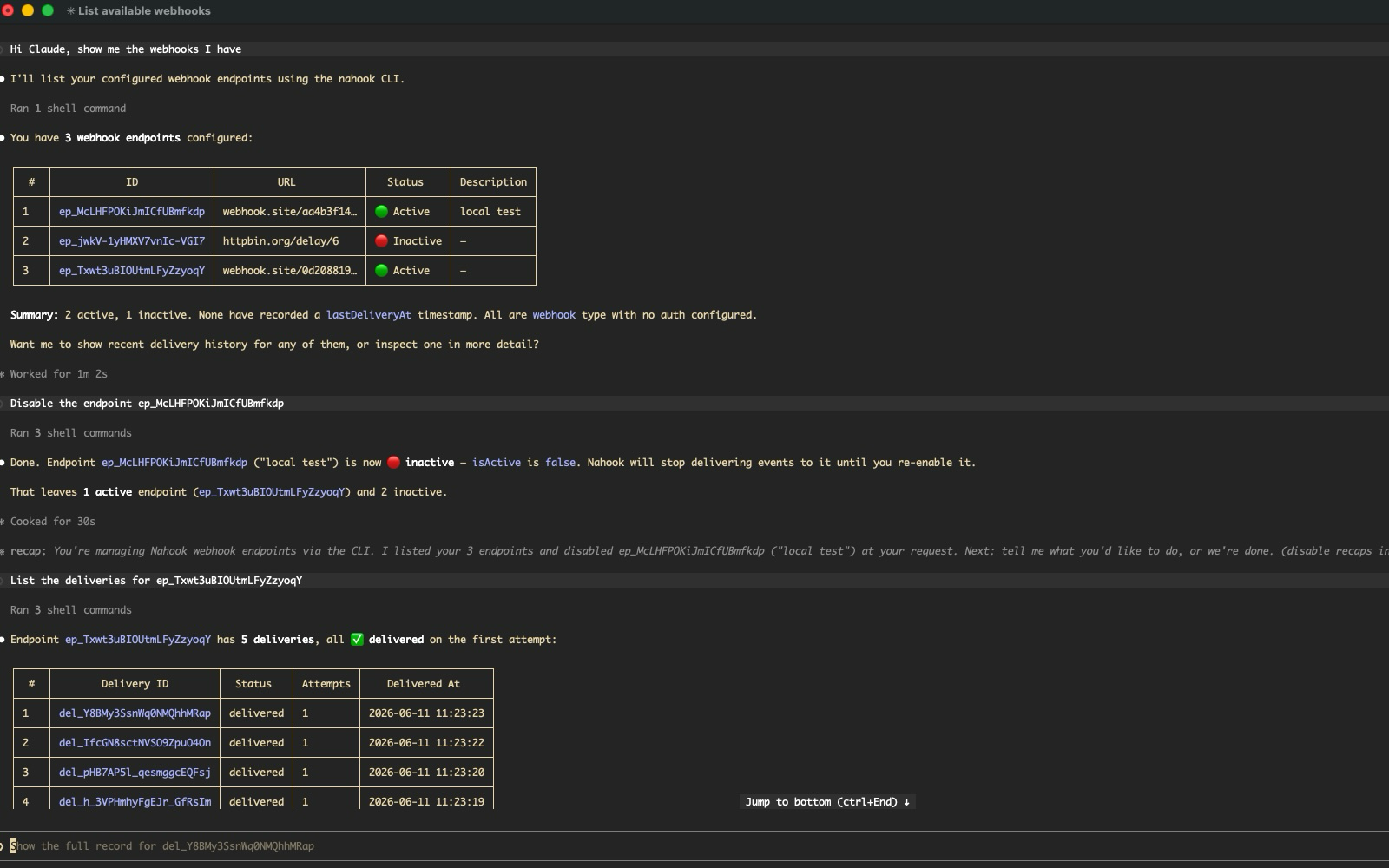
Conversational webhook debugging
Real prompt → real Nahook tool call → real response, in the same window where you're writing the integration.
Two ways to connect
Pick the hosted URL for zero-install OAuth, or the local CLI for the full toolset.
Hosted
Recommended
One URL — https://mcp.nahook.com/. Connect over OAuth in your browser. Nothing to install or store. 10 tools: read, manage endpoints, retry.
- • Works in Claude, ChatGPT, Cursor, VS Code
- • OAuth 2.1 + PKCE — no keys to paste
- • Scoped to one workspace per connection
Local CLI
The nahook mcp serve subcommand of the CLI. One binary, one login. All 12 tools, including firing production events.
- • Adds
trigger_event+send_to_endpoint - • stdio transport for any local client
- • Auth lives in
~/.nahook/config.toml
Works with every MCP-compatible client
What you can ask your AI
Real prompts that work today. No special syntax, no tool names to memorize.
Debug a failed delivery
"The webhook to ep_acme_prod failed three times yesterday. Show me the last delivery and explain why the receiver rejected it."
Claude pulls the delivery, inspects the response, and reads the attempt logs to diagnose the failure.
Retry from the conversation
"Retry every dead-lettered delivery for ep_acme_prod from the last hour."
Claude lists the failures, asks you to confirm, then re-enqueues them — one approval prompt covers the whole batch.
Fix a misconfigured endpoint
"ep_acme_prod is pointing at the old staging URL. Update it to https://api.acme.com/hooks and retry the last failed delivery."
Claude calls update_endpoint, asks you to approve, then retry_delivery — the fix and the replay in one turn.
Audit endpoints before a launch
"List every active endpoint in this workspace and when each last received a delivery. Flag any that have been quiet for a week."
Claude walks the list, pulls last-delivery metadata, and gives you a launch checklist.
10 tools hosted, 12 with the CLI
Every tool calls the same Nahook API with your workspace's permissions. The two event-firing tools are CLI-only — they send real production webhooks.
whoami Workspace, role, region, token. list_endpoints Every endpoint in the workspace. get_endpoint Fetch one endpoint by id. list_environments Every environment in the workspace. list_deliveries Page through deliveries newest-first. get_delivery Inspect a single delivery. list_attempts Every attempt against a delivery. create_endpoint Create a new endpoint. update_endpoint Pause, resume, change URL. retry_delivery Re-enqueue a failed delivery. trigger_event Fire an event and fan out to subscribers. CLI only send_to_endpoint Send directly to one endpoint. CLI only Safe by design
Your AI assistant gets exactly the permissions you have — no more, no less.
Per-call approval
Every write tool is tagged with MCP's destructiveHint.
Your client surfaces an approval prompt before anything mutates state.
OAuth, scoped per workspace
The hosted server connects over OAuth — permissions are checked every call against your role, and each connection is scoped to one workspace. Revoke it from the dashboard any time.
Payloads are untrusted
Webhook bodies can contain attacker-controlled text. Signing secrets and endpoint credentials are never returned by any tool, and write actions always wait for your approval — so a poisoned payload can't act on its own.
Listed in the MCP directories
Your AI assistant is one URL away.
Add https://mcp.nahook.com/ as a connector and talk to your webhook infrastructure in plain English.